Why are there blank pages in my copies?
The blank pages Papeez adds to your copies, and how to print your copies without surprises.
Written By Florian Barral
Last updated 9 days ago
Papeez sometimes adds blank pages to the copies. They are intentional: they let you print every copy double-sided without an answer sheet ending up on the back of a question sheet.
How a copy is put together
Every copy follows the same order:
the answer sheet, alone on its sheet: its back is a blank page;
the question sheets, completed with blank pages if needed so that every copy has the same number of pages, and an even number.
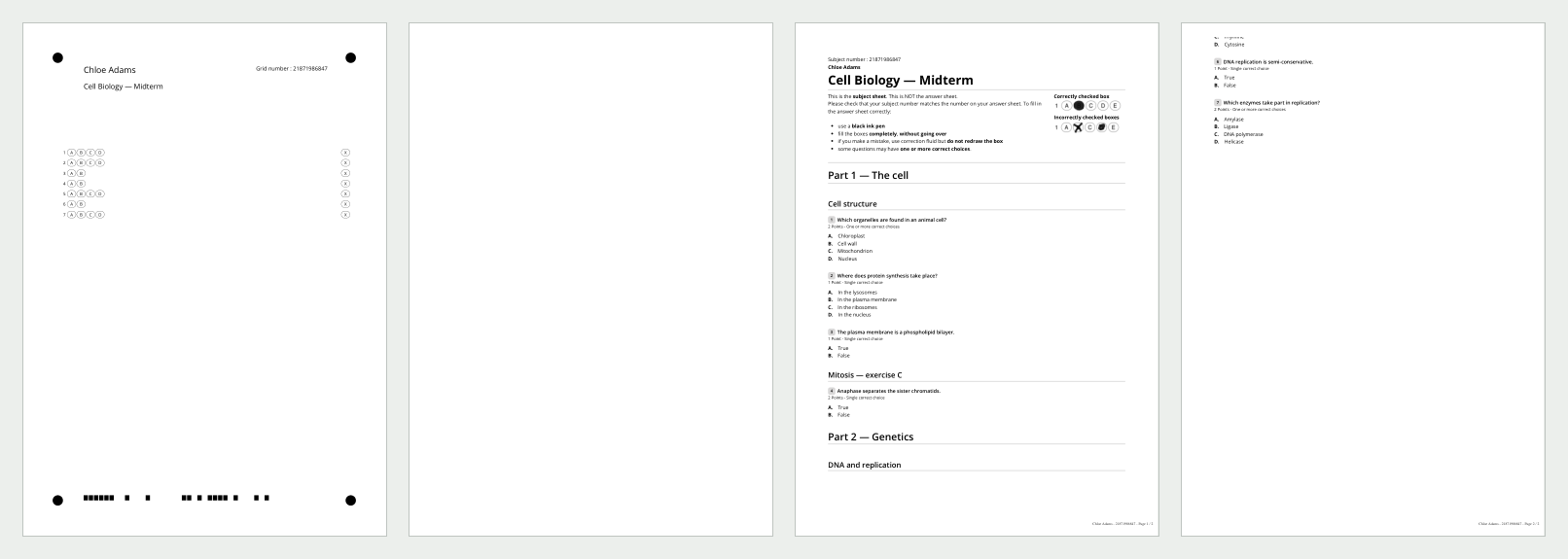
This way, when printing double-sided, each copy starts on a new sheet, and you can set up automatic stapling on your printer or ask your print shop to staple each copy.
Why some copies have more pages
Papeez keeps each question and all its choices on the same page. If the questions are shuffled (Shuffle questions and choices), one copy may end up one page longer than another. Every copy then takes the page count of the longest one, completed with blank pages.
Reduce the number of pages
Put the choices or the questions in two columns, or reduce the font size: see Lay out the subject: columns, font, size.
Avoid shuffling questions of very different lengths, or shuffle the exercises rather than the questions.
Shorten the instructions printed at the top of the question sheet: see Customize the instructions and sheets.
Print only some sheets
The Download copies menu also offers Answer sheets only and Subjects only. The Answer sheets only PDF keeps a blank page after each answer sheet: print it double-sided, or single-sided by selecting the odd pages in your print dialog.
Was this helpful?
Still need help? Ask the team