Get started

Terms used in Papeez

Copy, subject, question sheet, answer sheet, scan, grade: the words used in Papeez and their equivalents.

Written By Florian Barral

Last updated 9 days ago

Copy, subject, question sheet, answer sheet… Here are the words used in Papeez and in this help center, with the terms you may use on your side.

People

In this help center

In your context

Participant: the person taking the exam

student, pupil, candidate, learner, trainee

You: the person who creates and grades the exam

teacher, professor, trainer, grader, exam board

Your colleagues: the other users of your organization

teaching team, registrar's office, exams office

In the app, participants are named with the word your organization chose, for example Students in the Assign tab.

What you print
Term

Definition

Also called

Copy

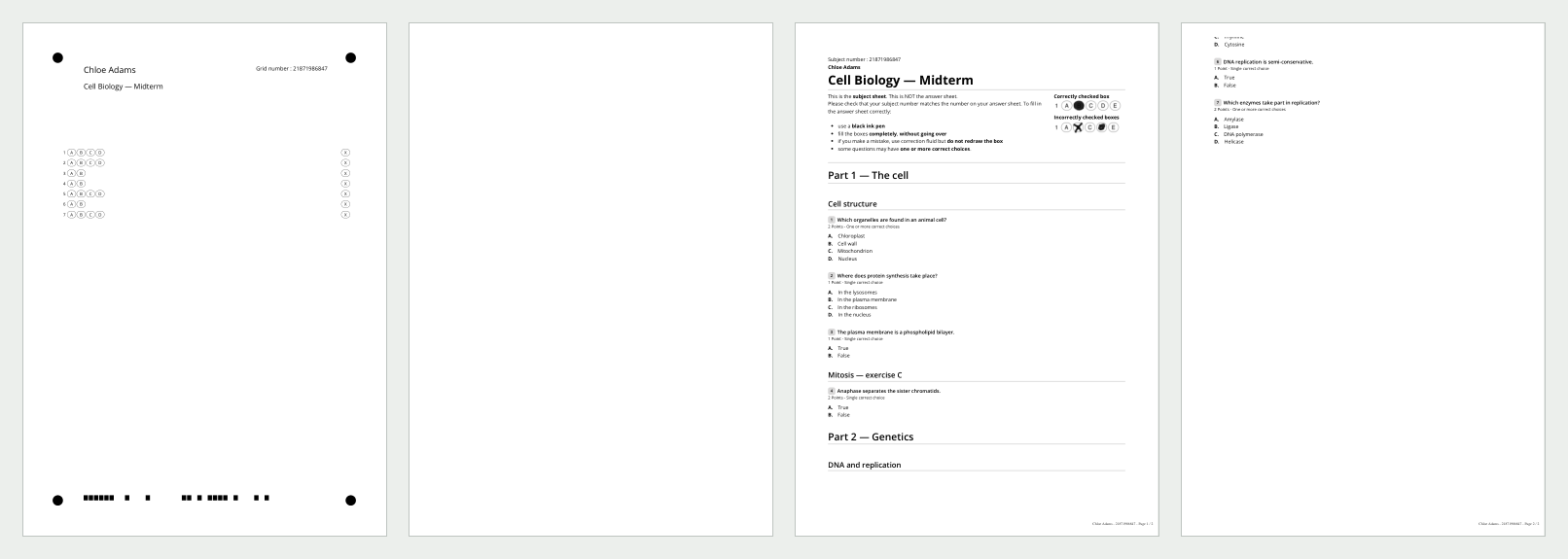
The set printed for one participant: the answer sheet and the question sheets. A copy is identified by its barcode.

booklet, exam booklet, exam paper

Answer sheet

The sheet where the participant fills in the boxes. It is the only sheet to scan. It carries a Grid number, a barcode and four black dots in the corners.

answer grid, grid, bubble sheet, OMR sheet

Question sheet

The pages that contain the questions. They carry the Subject number and the default line "Ceci est la feuille d'énoncé. Ce n'est PAS la feuille de réponse." (This is the subject sheet. This is NOT the answer sheet.)

subject sheet, questionnaire, printed subject

Nominative copy

A copy printed with the name of an enrolled participant.

personalized copy, named copy

Anonymous copy

An interchangeable copy: the participant writes their name and student number on the answer sheet.

non-nominative copy, anonymous grid

Batch

A group of copies printed separately, for example for one exam room.

lot, room

Terms used in Papeez

Above, a copy: the answer sheet (and its blank back), then the question sheets. See Understand the answer sheet and Nominative or anonymous copies.

The content of the exam

Term

Definition

Also called

Exam

A subject and its settings, taken by one or more participants.

test, quiz, midterm, assessment, MCQ

Subject

All the sections, exercises, questions and choices of the exam, written in the Create › Subject tab. When printing, "subject" also means the question sheets of a copy (Subjects only in the download menu).

questionnaire, test paper

Section

A part of the exam that groups exercises.

part

Exercise

Several questions grouped together, with an optional shared statement.

block, question group

Question

A checkbox question: MCQ (one or more correct answers possible), SCQ (a single correct answer) or True/False.

item

Choice

A possible answer, marked as correct or not.

option, answer, answer option

Pool and random draw

A reserve of exercises from which each copy draws at random.

bank, variants

Grading scheme

How points are awarded to answers and turned into a grade.

scoring, marking scheme

See Structure a subject: sections, exercises, questions and Set the grading scheme.

After the exam

Term

Definition

Also called

Scan

The PDF of the completed answer sheets, imported in the Scan tab.

digitization, scanned copies

Page to review

A scanned page Papeez could not process on its own: unrecognized page, duplicate, participant to confirm.

scan error, rejected page

Grading

The automatic calculation of the grade from the boxes read and the correct answers of the subject.

scoring, optical mark reading

Grade

A participant's result on the exam.

score, result, mark

Answer key

The PDF of the subject with the correct answers, to download in the Print tab.

corrected subject, marking key

Graded submission

The PDF of a participant's answers, with their points.

annotated copy, individual feedback

Convocation

The email sent to each participant before the exam, with your instructions.

invitation, exam notice

Frequently asked questions

Papeez grades from the correct answers checked in the subject editor. The answer key is the printable version of those same answers: it shows exactly what Papeez expects. Editing the PDF changes nothing; to change a correct answer, change it in the subject. See Download the blank subject or answer key and Fix the subject and recalculate grades.

The subject is your questions. A copy is what is printed for one participant: their question sheets (the questions, possibly shuffled) and their answer sheet. Only the answer sheet is scanned.