Match a copy to a participant
Validate the suggested participant for an anonymous copy, or change the participant of a page.
Written By Florian Barral
Last updated 9 days ago
Each scanned page must be matched to a participant to be graded. In nominative mode, this is automatic: the barcode points to the copy of the participant whose name is printed on it. In anonymous mode, Papeez reads the first name, last name and student number written on the sheet and compares them with the list of enrolled participants.
Validate the suggested participants
When the handwriting leaves a doubt, the page goes to Student to manually confirm or Student not found.
In Scan › Import scans, click Details in the Pages to review block.
For each page, Papeez shows the first name, last name and student number as written, with the participants that match best.
Click the right participant, or search for them in the Choose student list. The page is graded right away and the next one shows.
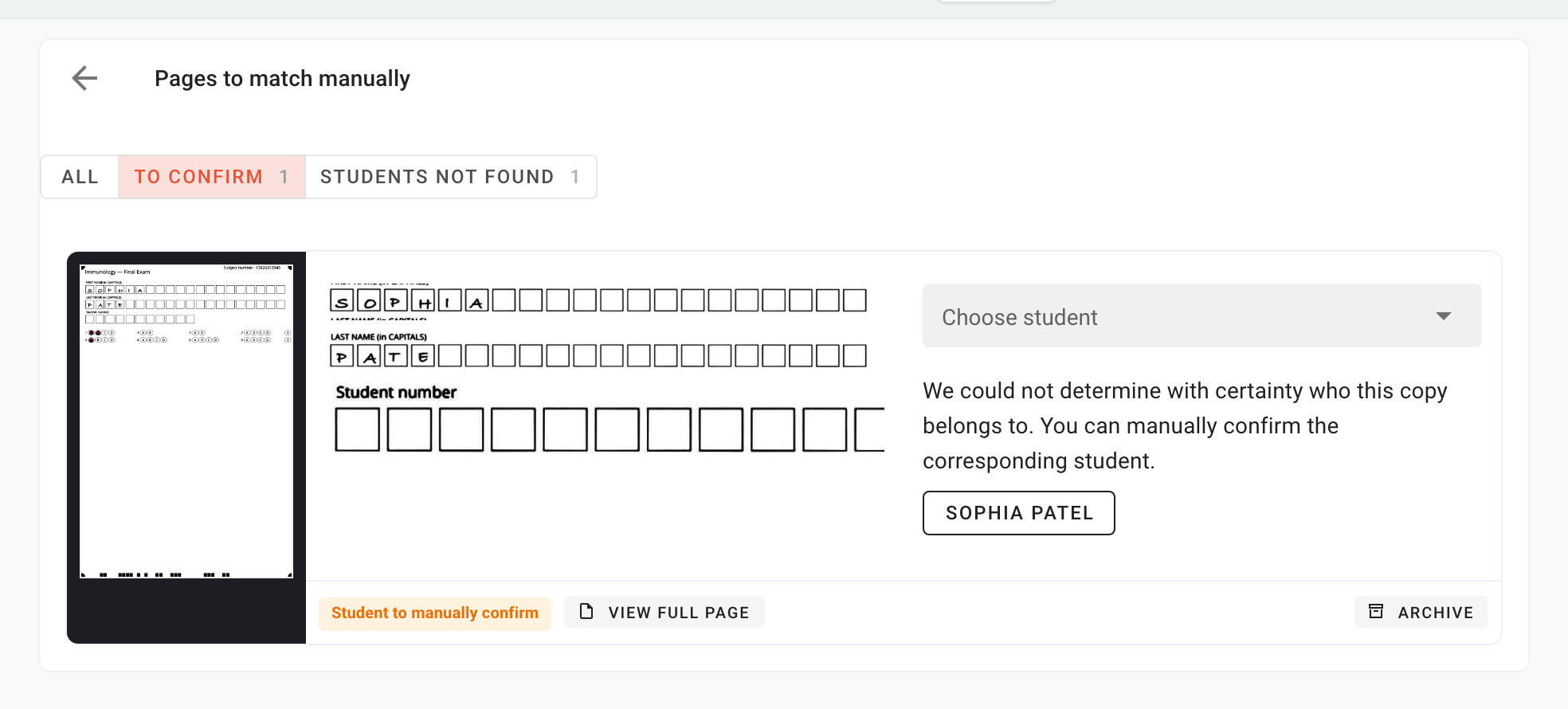
The filters at the top of the page separate the pages To confirm and the Students not found.
The participant is not in the list
Papeez only suggests participants enrolled in the exam. Enroll the person in the Students tab (see Import participants), then come back to the page to match it, or select the page in the list of scanned sheets and click Rerun analysis.
Change the participant of a page already graded
In both modes, you can fix a match: a participant filled in someone else's copy, or a page was matched to the wrong person.
In the list of scanned sheets, click the page.
Choose the right participant in the field provided.
The grade moves to this participant. If another page was already assigned to them, Papeez flags it: a participant can only have one graded copy.
Frequently asked questions
Why are some anonymous copies not found?
Why are some anonymous copies not found?
Most often, the handwriting is hard to read, the participant did not fill in every field, or they are not enrolled in the exam. Ask participants to write in capitals, one letter per box, and to fill in the student number: it is the most reliable field. See Understand the answer sheet.
Can I grade a copy without scanning its answer sheet?
Can I grade a copy without scanning its answer sheet?
No: a grade is always calculated from a scanned page. If a participant's sheet is damaged or annotated, scan it anyway, match it to the participant, then fix the boxes if needed: see Fix the boxes read on a copy.
Was this helpful?
Still need help? Ask the team