Multiple choice, single choice and True/False questions
Question types on paper, the correct answer, the printed instruction and switching between multiple and single choice.
Written By Florian Barral
Last updated 9 days ago
A paper exam contains choice questions: multiple choice, single choice and True/False. Here are their differences, how to set the correct answer and how to change a question's type afterwards.
The three question types
Open questions do not exist on paper. For a text with no answer in the middle of an exercise, use a Complementary statement.
Create a question
Click Add, then MCQ, Single choice or True/False. The two icons next to Add directly create a single choice or a multiple choice question.
Type the statement in place of Question name.
Add the choices with + Choice. A paper exam accepts up to 8 choices per question.
Set the correct answer: check the box of the correct choices (multiple choice), or the button of the correct choice (single choice, True/False).
Click the number of points, next to the type (1 Point by default), to change it.
For how points are calculated, see Set the grading scheme.
Switch between multiple and single choice
Hover over the block: a trash can and a six-dot handle appear on its left. Click the handle to open its options.
Choose Convert to SCQ or Convert to MCQ.
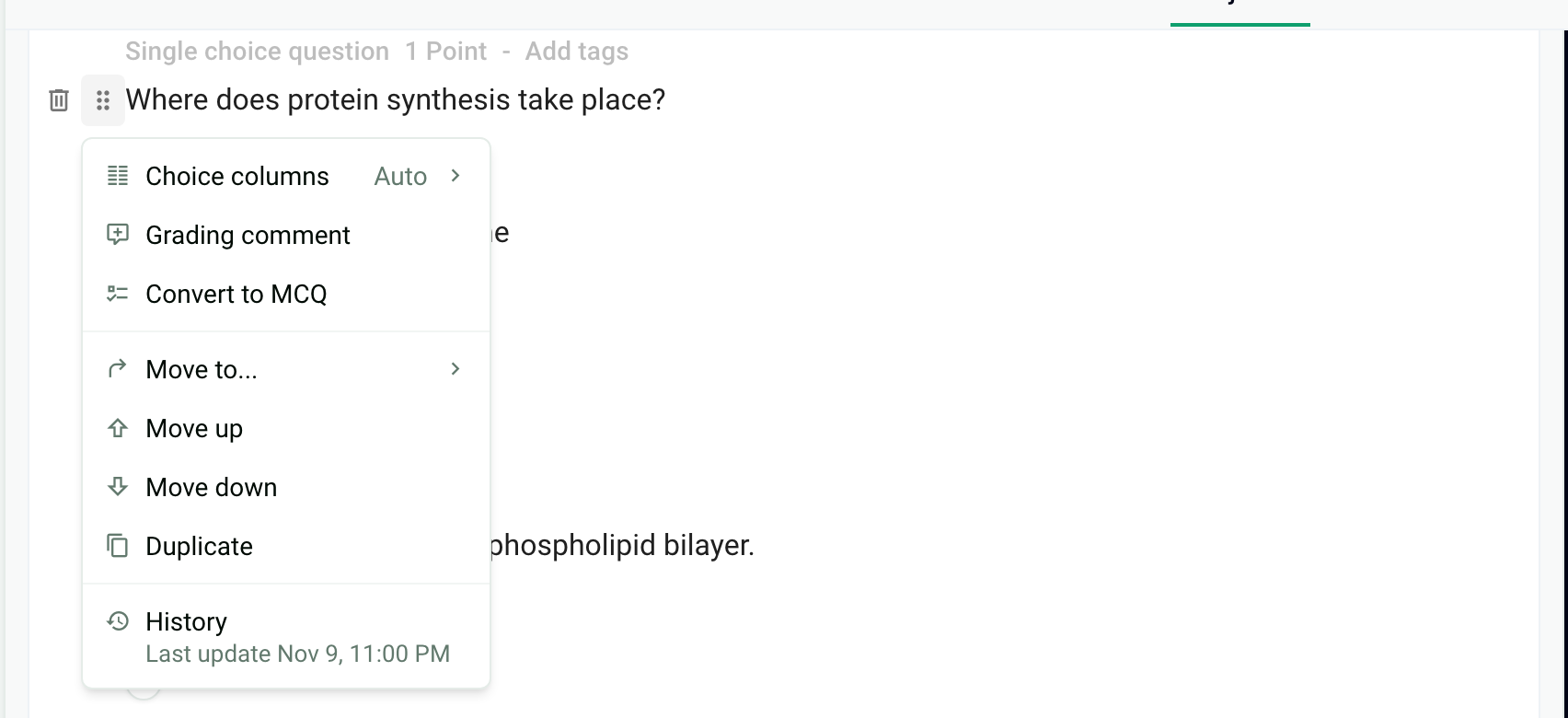
Convert to SCQ stays grayed out while several choices are marked correct: keep only one correct answer, then convert. A True/False question cannot be converted: delete it and create a single choice question if needed.
Change the printed instruction
Below each question, Papeez prints the points and an instruction: One or more correct choices for a multiple choice question, Single correct choice for a single choice or True/False question. To change these texts, open Configure › Personalization of instructions, edit the Single correct choice and One or more correct choices fields, then click Register. See Customize the instructions and sheets.
Limits and errors
Up to 8 choices per question, at least 2.
Up to 120 questions per exam, 90 if a question has more than 5 choices.
An incomplete question is flagged below its statement and in the Errors counter at the top of the editor, for example Add at least one correct choice or A single-choice question can only have one correct answer. The copies cannot be generated until it is fixed.
Frequently asked questions
A question imported as multiple choice should be single choice
A question imported as multiple choice should be single choice
Open the question's menu with the six-dot handle, then Convert to SCQ. First check that only one choice is marked correct.
Convert to SCQ is grayed out
Convert to SCQ is grayed out
The question has several correct answers. Uncheck them until only one is left, then convert.
Can participants see whether a question has one or more correct answers?
Can participants see whether a question has one or more correct answers?
Yes, through the instruction printed below each question. You can change its text, but not remove it. See Customize the instructions and sheets.
How is a single choice question graded?
How is a single choice question graded?
Like a multiple choice question with only one correct answer, according to the exam's grading scheme. See Set the grading scheme.
Was this helpful?
Still need help? Ask the team